
open source · self-hosted · OpenAI Agents API
An open-source, self-hosted implementation of the OpenAI Agents API. Run Codex, Claude Code or MiniMax Code with your own models, on your own machines, through the official OpenAI SDK.
$ curl -fsSL https://github.com/MiniMax-AI/OpenAgentCore/releases/latest/download/install.sh | bashLinux amd64 · Docker · Python 3.9+
- api
- /v1 · OpenAI Agents API
- harness
- codex | claude_sdk | mcode
- protocol
- responses | anthropic | chat_completions
- sandbox
- docker | microsandbox | e2b
- machine
- linux | macos | windows
Calling a model is solved. Letting an agent do the work is not.
An agent reads files, runs commands, waits for tests and asks for approval. A single model response is one step of that. Put it inside a product and a new set of questions appears.
?The user closed the tab. What happens to the work already submitted?
→A dropped connection is an observer leaving. The Turn keeps running; read its durable state.
?The request timed out. Send it again, or look up the original?
→Poll durable state. Supported submission paths are idempotent, so a lost response does not duplicate work.
?The user pressed Stop. Did the output stop, or the agent and everything it started?
→Cancellation has a receipt: Core confirms the Turn's execution and cleanup state.
?Which model and which machine ran this? Where are the files and the log?
→Sessions, Turns, Items, artifacts and usage are stored by Core and queryable through the API.
?Switching from Codex to Claude Code, or Docker to E2B. How much product code changes?
→Your code keeps the same API calls. The harness is a Session setting with a matching model provider, and the sandbox is the administrator's choice, behind a Sandbox Provider.
Between an agent that works in a terminal and an agent a product can call, there is a whole layer of engineering. OpenAgentCore is that layer.
Choose the model, the agent and the machine separately.
They are three different decisions. Each Session names its harness, its model provider and its Environment; Core validates the combination before anything runs.
 1from openai import OpenAI
 2
 3client = OpenAI()  # OPENAI_BASE_URL → your Core
 4
 5session = client.beta.agents.sessions.create(
 6    environment={"type": "openai_hosted"},
 7    input="Fix the failing test and explain the change.",
 8    extra_body={
 9        "agent": {"model": MODEL, "x_agents_core": {"harness": "codex"}},
10        "x_agents_core": {"model_provider": {
11            "protocol": "responses",
12            "base_url": BASE_URL, "api_key": API_KEY,
13        }},
14    },
15)
The supported combinations are declared by each harness, not guessed. Harness capabilities →
- [api]
Same API as OpenAI
Point the official OpenAI SDK, or plain HTTP, at your installation. No new client to learn.
- [agent]
Your choice of agent
Each Session runs a native harness: Codex, Claude Code or MiniMax Code, with the model provider you configure.
- [machine]
Your choice of machine
A managed sandbox (Docker, microsandbox or E2B), or your own Linux, macOS or Windows machine.
- [swap]
Every part is replaceable
Sandboxes, harnesses and model providers plug in through defined protocols. Swap one without touching Core.
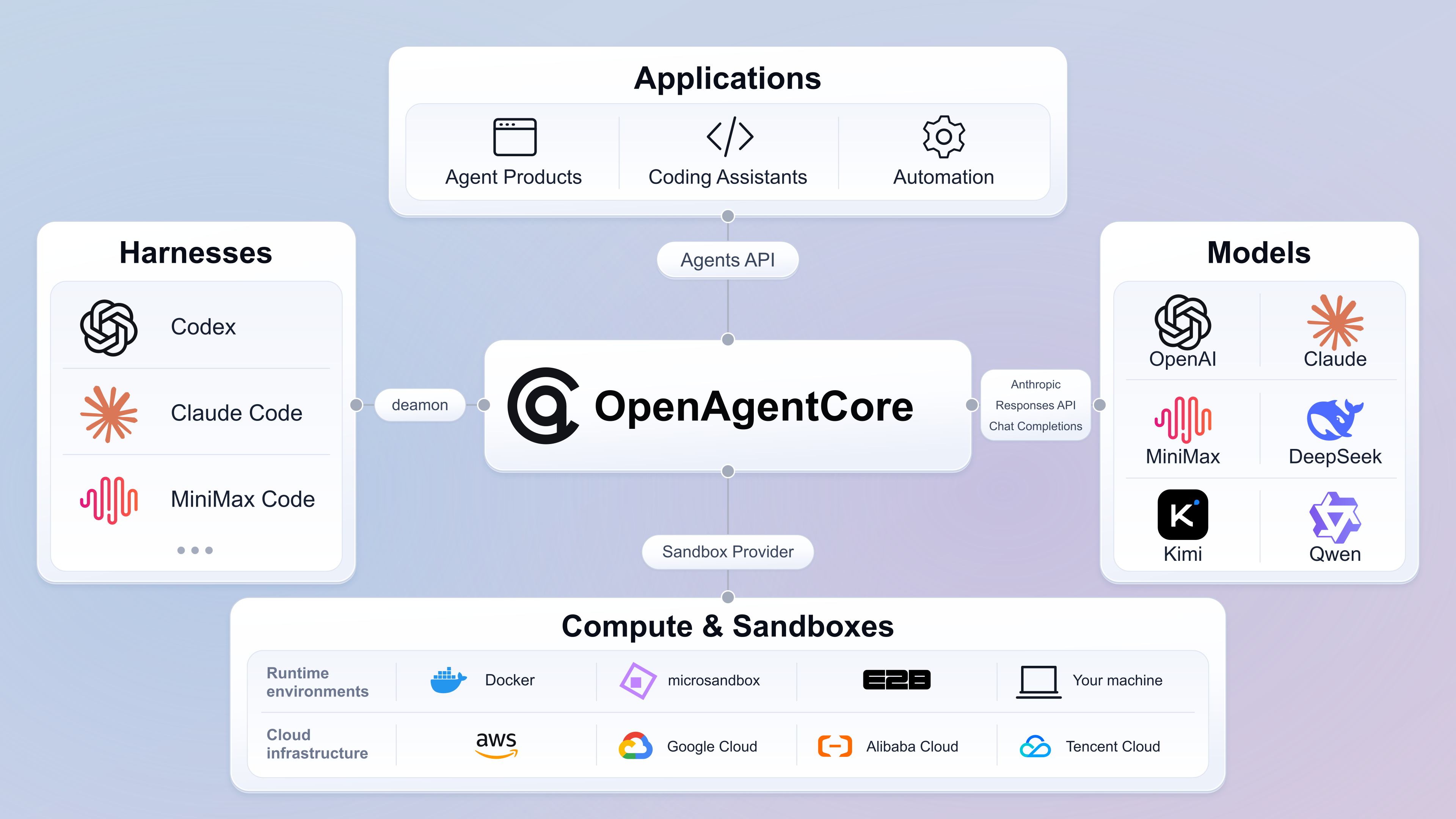
Every part plugs in through a protocol.
Core keeps durable execution state and schedules work. The Runtime prepares the Environment and starts the native harness. The harness calls the model and tools, and reports back through the Runtime.
A run becomes a Session you can manage.
A Session is a continuing piece of agent work; a Turn is one input executed inside it. Both have identities and durable state. Four rules decide what "running", "waiting", "cancelled" and "failed" mean.
Connection ≠ work
Closing the stream only removes an observer. Submitted work stays with the execution system.
Retries have identity
Supported submission paths carry a stable key, so a lost response never creates the work twice.
Cancel has a receipt
Closing output proves nothing. Core confirms the target Turn's execution and cleanup.
Execution ≠ machine
A Turn ending, the executor closing and the Environment being reclaimed are separate lifecycles.
!Recovery has limits, and they are explicit: an unknown outcome is never reported as success.
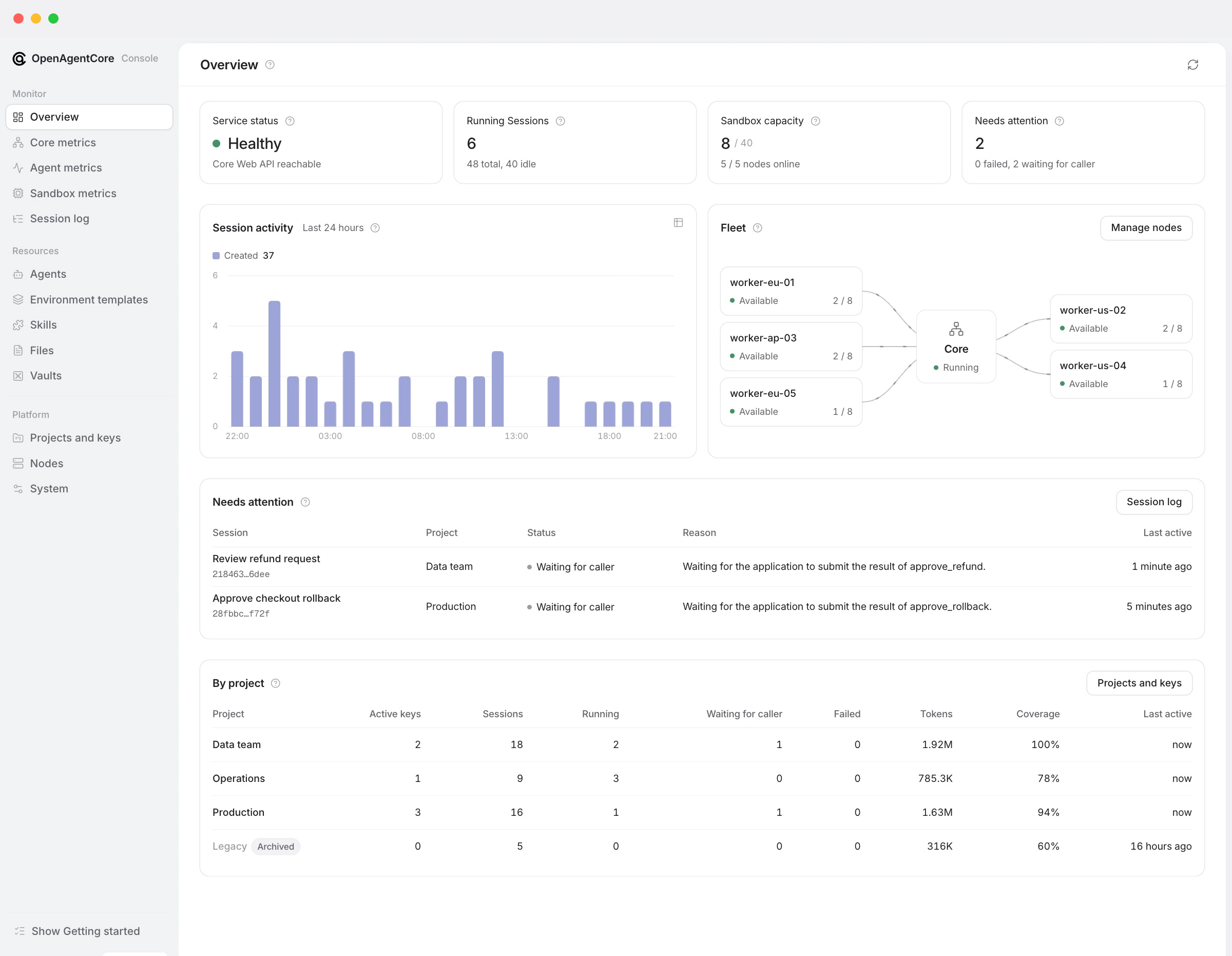
Operations you can actually see.
Web is the operator console: Sessions, node capacity, work waiting for the caller, errors, latency, tokens and tool calls, per Project.
Screenshot values are illustrative. Usage visibility depends on what each native harness reports.
What you still own, depending on how you build.
| approach | fits when | you still own |
|---|---|---|
| Call a model API | One-off inference, or you want full control of the agent loop | Context, tool execution, the loop and the whole task lifecycle |
| Call a native CLI or SDK | Personal automation, or one integration around one harness | Session mapping, processes, resources and every engine's differences |
| Use a sandbox service | You need an isolated computer | The agent engine, execution, interaction, records and the product API |
| Use OpenAgentCore | Self-hosted, many native harnesses and environments behind one API | Business permissions, product experience, team orchestration and operating your installation |
State belongs to the infrastructure.Intelligence belongs to the harness.
The choices behind the design.
- 01
Native harnesses, with their constraints
The Runtime and the native harness run inside the Environment; Core holds the durable control plane. Native engines are reused as-is, so the Environment, native history and recovery still matter.
- 02
One protocol, real differences
A capability one harness supports is not silently granted to another. Core checks each combination before running, rejects what is unsupported and records what is unverified.
- 03
Simple for the caller
Callers think in tasks, input, state and results. Machine connections, native executors and cleanup belong behind clear component boundaries. The interface is the product.
From install to first Session.
On a Linux amd64 host with Docker and Python 3.9+:
- [1]
Sign in to Web
Use the Core key the installer created, then configure the domain and HTTPS.
- [2]
Set a default model
Then issue a Project API key for your application.
- [3]
Add execution capacity
A node, E2B, or your own machine.
- [4]
Run your first Session
With the official OpenAI SDK, against your own Core.
Version 1 is the foundation.
OpenAgentCore is pre-release; support is qualified per harness, environment and operation. The next layers we are working toward:
- harness
Agent loop, decoupled
Run the agent loop on the server and tool execution on a local machine or a cloud sandbox, with enterprise authorization at the tool layer.
- compute
Faster, denser compute
Separate compute from storage, restore state quickly and scale sandbox capacity on demand.
- storage
More storage backends
S3, OSS, shared file systems and agent-native file systems.
- apps
Applications on the Agents API
Keep building real products on the public API, the same way any application uses it.
Everything is in the docs.
21 pages, listed straight from the repository's docs.json. New guides appear here when they are added.
01/Get started
- OpenAgentCore documentationOpenAgentCore runs AI agents on your own infrastructure behind the OpenAI Agents API.
- Install Core and WebOne command installs Core, the Web console and PostgreSQL on a Linux host.
- Run your first SessionThis walkthrough takes you from a Project API key to an agent that has created a file and reported back.
- ExamplesComplete applications built on the Agents API.
02/Operate
- Installation options and advanced deploymentsThe default installation needs no options.
- Add and manage nodesA node is a Linux host that runs sandboxes for Core-hosted Sessions when the sandbox backend is Docker or microsandbox.
- Self-hosted executorsA selfhosted Session runs on a machine your application owns: a workstation, a VM or a sandbox you manage.
- Operate your installationThe installation operator owns the Core host, its storage and its availability.
- Configuration referenceEvery setting of a Core installation has exactly one home.
03/API guides
- API namespaces and credentialsCore serves three namespaces.
- Agents API guideCore serves the OpenAI Agents API at /v1.
- Core administration APIThe Core administration API (/core/v1) manages an installation: Projects and their API keys, reads and deletion of Project resources, executor credentials, deployment default mo…
- Machine connection APIMachines call Core under /api/v1: sandbox nodes, Runtime daemons and the self-hosted installer.
- Harness capabilitiesThis page lists what each Harness supports on each placement.
04/Architecture and extensions
- Concepts and ownershipA Project is the execution tenant in OpenAgentCore.
- ArchitectureOpenAgentCore separates orchestration, compute and native execution.
- Core–Runtime protocolThis protocol connects Core to a Runtime daemon after the daemon has its machine credential.
- Runtime bootstrapA Sandbox Provider starts a managed Runtime by handing it one bootstrap file.
- Add a Sandbox ProviderA Sandbox Provider supplies the outer compute that a Runtime daemon runs in for a Core-managed Environment, and the bounded bootstrap that starts that daemon.
- Add a native Harness to OpenAgentCoreA Harness is a native agent engine (Codex, Claude Code, MiniMax Code) that runs the model and tool loop.
- Develop OpenAgentCoreSet up a checkout, build a component and validate your changes.
Products differ in interaction, model and engine. They can share one execution layer.