
Web is the administrator console of one OpenAgentCore deployment. Administrators use it to watch health, capacity, usage and failures, inspect each Project's resources and execution history, and manage Projects, keys, nodes and deployment settings. Applications do not use Web; they call Core's Agents API (/v1) with their own Project API keys.
Sign in
Sign in with the deployment's Core key; the console has no user accounts. The browser keeps only a session cookie, and the console server sends the Core key to Core on its behalf; sign-in describes how long a session lasts.
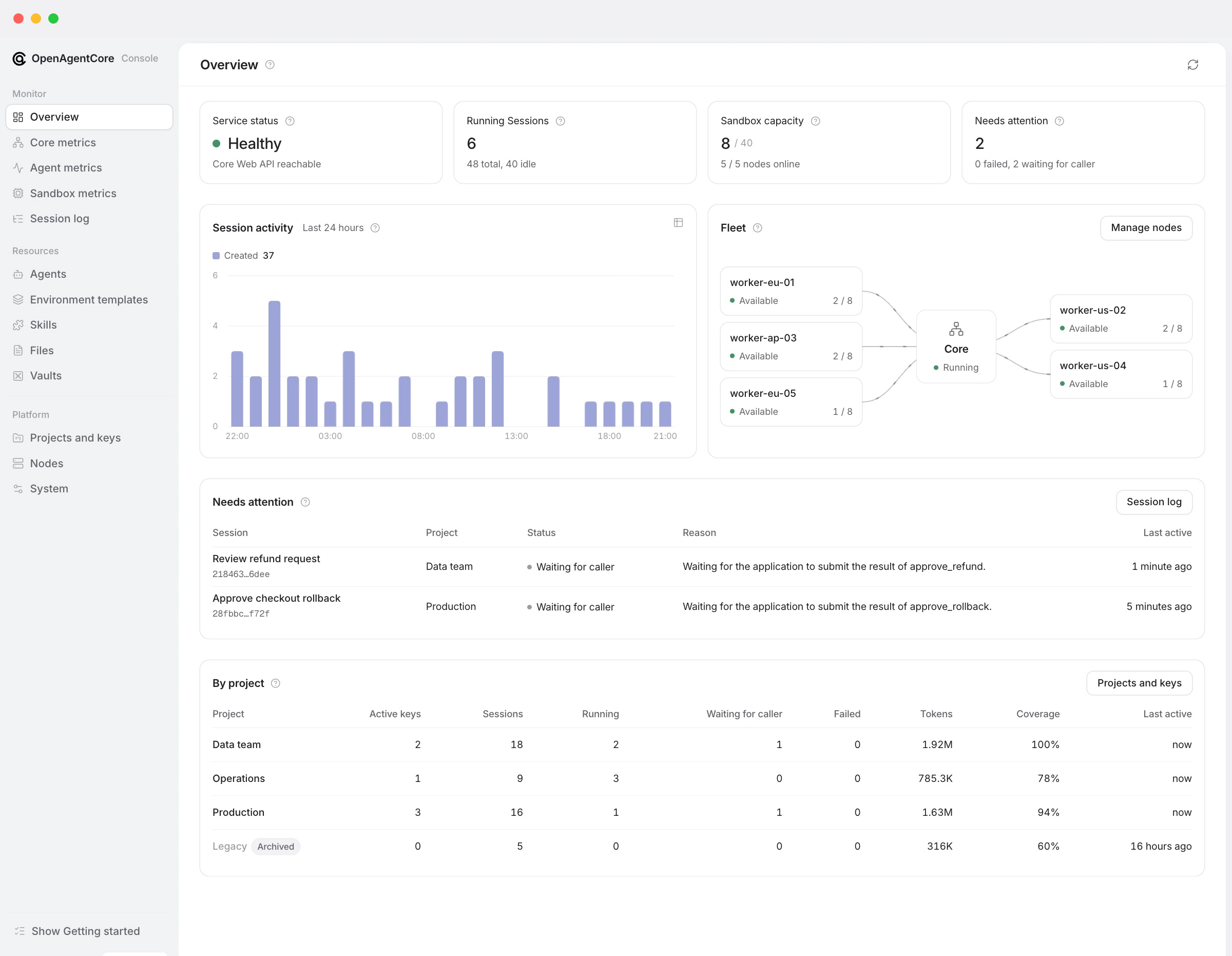
Signing in opens the Overview. While any step is still to do, its Getting started checklist leads through four steps in any order: sandboxes ready, a default model provider, a Project with an active key, and a first Session. An optional tour of the console opens from it.
Console pages
| Group | Page | Purpose |
|---|---|---|
| Monitor | Overview | Service status, running Sessions, sandbox slots and work needing attention; 24-hour Session activity; Core and its nodes as a topology, each with a popover glance; Sessions needing attention; usage by Project |
| Monitor | Core metrics | The Core process: CPU and resident memory against their limits, execution slots and the Turn queue, connected daemons, database latency and pool, background jobs |
| Monitor | Agent metrics | Requests, errors, duration, tokens, models, tools, Agents and API keys over 1 h, 6 h, 24 h or 7 d |
| Monitor | Sandbox metrics | Node capacity and hosted Runtime CPU and memory across Projects |
| Monitor | Session log | Every Session, and each Session's read-only conversation, trace and Turns with the classified reason of a failure; a self-hosted Session's page also manages its executor credentials and gives the command that connects a host |
| Resources | Agents, Environment templates, Skills, Files, Vaults | Inspection and permitted deletion, with the Project and the creating key of each resource |
| Platform | Projects and keys | Create, rename and archive Projects; issue and revoke keys; each Project's usage, write history and how to call the API |
| Platform | Nodes | Add, edit and remove Docker or microsandbox nodes; each node's readiness, capacity and allocations |
| Platform | System | The installation's public address, API base URL, ID and source commit; Domain and HTTPS; each harness's default model; Sandbox configuration; Core's config.json startup settings, read-only, with where to change them |
Missing data is shown as missing (—), never as zero. Console API usage lists what each page reads and how its figures are bounded.
What administrators do here
| Task | Where |
|---|---|
| Give the installation an HTTPS address | System → Domain and HTTPS, on an installation with managed ingress; see Make Core reachable |
| Choose the sandbox backend (Docker, microsandbox or E2B), the sandbox size and Runtime, or reset the backend | System → Sandbox configuration; see change the sandbox configuration |
| Add or remove execution nodes | Nodes; see the nodes guide |
| Set the default model of a harness | System → Default model configuration; see default models |
| Create a Project and issue its API keys | Projects and keys; see Projects and API keys |
| Issue, rotate or revoke a self-hosted executor's credential, or copy its install command | The Session's page in the Session log; see self-hosted executors |
| Delete a resource, for example a leaked Credential | The resource's row in its list, or its page; Files are deleted from the Files list. The public deletion rules apply |
Installation creates no Project or key. Opening the console neither allocates compute nor calls a model, and an installation may have zero nodes. Web never starts a Session or sends input. Archiving a hosted Session requests cancellation and reclamation; administrator authority state what administrators can and cannot do.
The deployment's sandbox backend serves hosted Sessions. An application's self_hosted Runtime, including one in its own E2B account, is a separate path that the sandbox configuration does not change.
A loopback public address (local_only) keeps nodes and remote applications from reaching Core. The console stays reachable at its own address and warns about it.
More
- Console server: request boundary, sign-in, settings and verification.
- Console API usage: the Core routes each page uses.
- Web package: developing the console.
- Administrator API: the
/core/v1routes behind the console.
OpenAgentCore Web is available under the MIT License.